
Why machinery quotes are slow to build
A machine is never just a machine. A 14-tonne excavator goes out with a hitch, a bucket set, piping, a cab option and a delivery charge, and each of those has its own price, its own supplier and its own rules about what it fits. In most dealerships that knowledge lives in a mix of manufacturer PDFs, an Excel sheet someone built in 2019 and the head of the best salesperson.
So every quote is a small research project. The salesperson finds the current list, works out the dealer price, checks the option fits, adds carriage, adds VAT, and types it into a Word template. Get one of those steps wrong and you either lose margin or lose the customer's trust. DigDealer replaces that whole chain with one screen.
Choose the machine, then only the options that belong to it
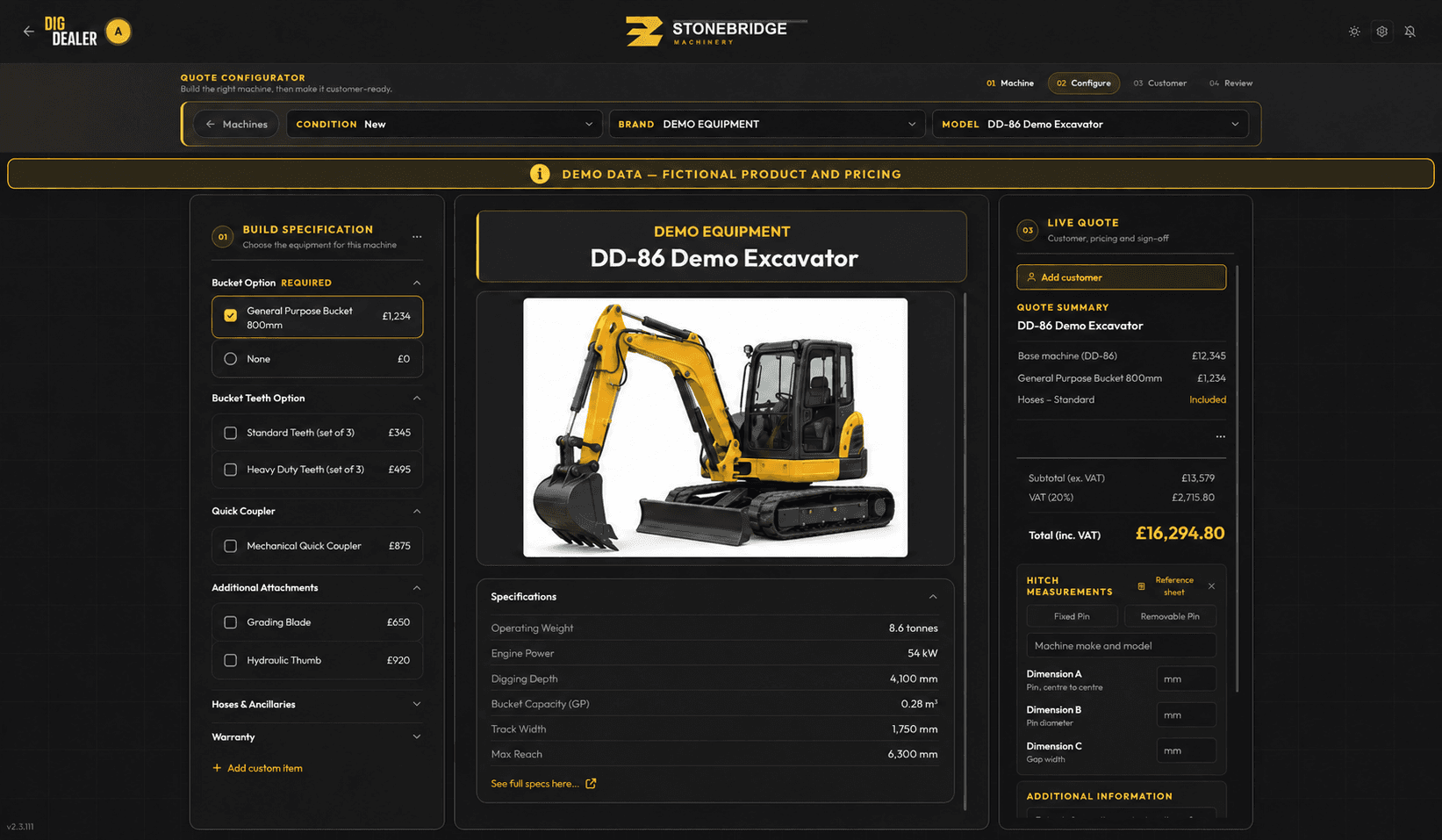
Your catalogue is loaded into DigDealer by brand, model and condition (new or used). When a salesperson picks a model, the configurator shows the options and add-ons linked to that exact model, grouped the way your team thinks about them: hitches, buckets, rotators, valves, cabs, warranty, delivery.
Options that only fit certain carriers are filtered out automatically, so nobody quotes a hitch plate for the wrong tonnage. Required choices are marked as required, and defaults that always ship with the machine are already ticked and shown as included. If a customer wants something that isn't in the catalogue, the salesperson adds a custom line with a price, and it is filed under the right category so it shows up properly next time.
- Models grouped by brand, category and condition
- Per-model options, so the list is short and correct
- Carrier and tonnage rules that hide options that don't fit
- Included items shown as included, not as £0 lines
- Custom lines for one-off requests, filed under a proper category
Price, VAT and lead time update as you build
Every tick changes the live quote panel next to the machine. Subtotal, VAT and total inc. VAT are always visible, along with the trade-in or part-exchange allowance and any deposit already taken. Selling prices come from your own pricing rules, so the number the salesperson sees is the number you set, not one they worked out on a calculator.
Each line also carries a lead time. DigDealer knows whether the machine is in stock or a factory order and shows the right delivery estimate for each case, which then prints on the quotation. That one detail answers the customer's second question ("when can I have it?") before they ask it. The pricing side is covered in detail on the margin and discount control page.
Show the customer, not the spreadsheet
The configurator was designed to be used across a desk or on a tablet in a yard. Product images, specifications and the running total are laid out so the salesperson can turn the screen round and walk the customer through the machine. Cost prices and margins are never on that screen; they stay with the owner and managers.
When the build is right, one tap takes it to the basket, where the customer's details, trade-in and deposit go in, and the branded quotation PDF is produced from the same data. Nothing is retyped.
Set up around the brands you sell
DigDealer's team builds your catalogue during onboarding from the price lists you already have, including euro lists from European manufacturers (how euro price lists work). Construction dealers get hitches, buckets and piping linked to the right machines; attachment and forestry specialists get compatibility and coupling details captured on the quote. See how that plays out for attachment dealers and construction equipment dealers.
Works hand in hand with
- Margin and discount controlMinimum markups, discount ceilings and approvals that reach the manager's phone in seconds.
- Branded quotation PDFsProfessional, branded machinery quotations with lead times, trade-ins and deposits, emailed in one step.
- Offline quotingQuote in barns, quarries and fields. The catalogue goes with you and drafts sync when signal returns.
Dealers who rely on it most
- Construction equipment dealersExcavators, dumpers and loaders quoted with the right hitches, buckets and piping every time.
- Attachment dealersRotators, grapples, hitches and breakers quoted with the carrier details that make them fit.
- Agricultural machinery dealersQuote on the farm, with no signal, and get the deal signed before you leave the yard.
Machine configurator: common questions
Do we have to load our own catalogue?
No. Onboarding includes building your catalogue from the manufacturer price lists and option sheets you already use. You check it, we correct it, and then your team can keep it up to date in DigDealer.
Can a salesperson add something that is not in the catalogue?
Yes. Custom lines can be added with a name, price and category. They appear on the quote like any other item and can be reused later.
Does the configurator handle used machines?
Yes. Machines can be quoted new or used. Used stock can be tracked, so a machine comes off stock when the deal is signed off.
Can customers use the configurator themselves?
It is built for your sales team to use with the customer, across a desk, in a yard or on a farm visit. It is not a public web configurator.
Updated